Environment Builders#
- DexSuite offers many ways to customize your setup, including different tasks, robots, controllers, and cameras.
This section shows you three ways to quickly generate the
ds.make(...)code you need to start your environment.
Manual Build#
The first way to create your setup is to write the ds.make(...) function by hand.
env = ds.make(
    "lift",
    manipulator="franka",
    gripper="robotiq",
    arm_control="osc_pose",
    gripper_control="joint_position",
    render_mode="human",
)
We will go more in detail with the API in API Overview. Setting every parameter by hand can be time consuming, therefore we introduce two ways to simplify environment building.
Web-Based Builder#
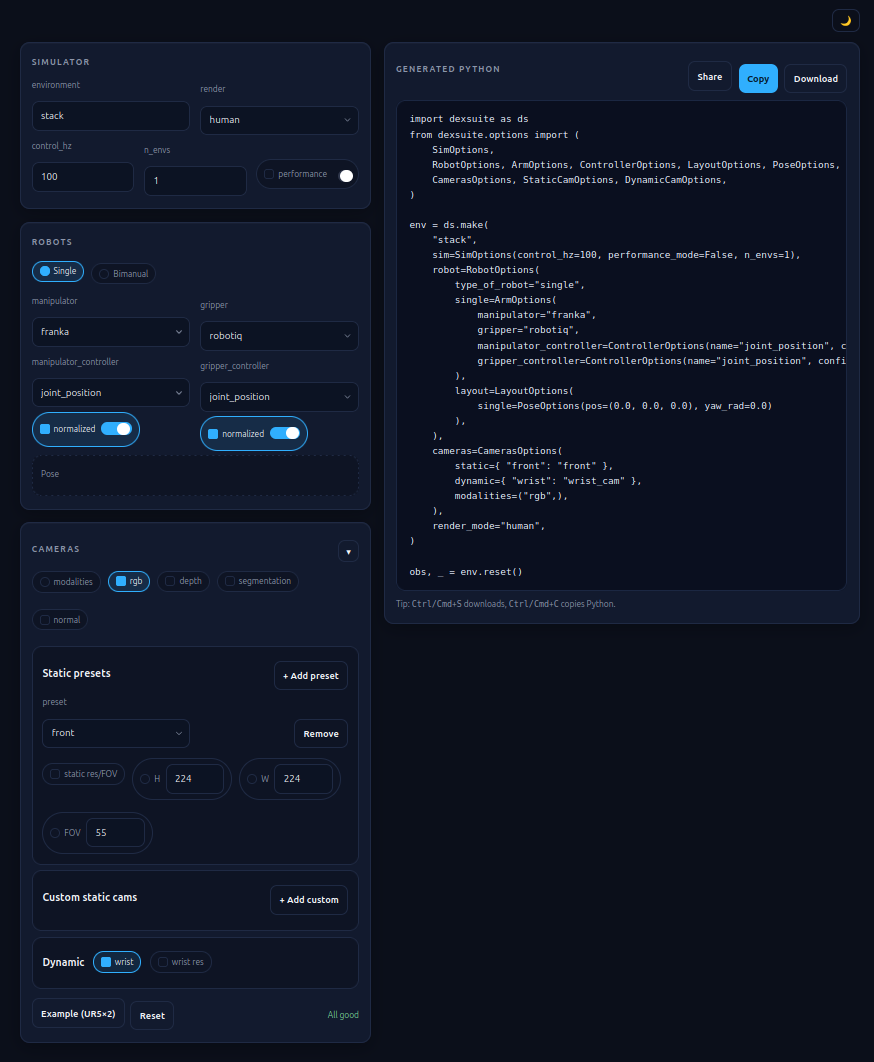
The Web builder is a single, self-contained file that runs entirely in the browser. You can access it in one of two ways:
Option 1: Run a Local Server#
You can serve the file locally using Python’s built-in HTTP server. Run this command from your terminal:
python3 -m http.server -d scripts/interactive_builder/
Once the server is running, open your web browser and navigate to http://localhost:8000/env_builder.html to access the builder.
Option 2: Open the File Directly#
Since it requires no backend, you can simply open the HTML file directly from your file manager into any browser. Locate the following file:
scripts/interactive_builder/env_builder.html
Double-click the file to open it. Configure your environment using the dropdown menus, and copy the generated ds.make(...) snippet into your script or notebook.
What It Generates#
Parameter |
Description |
|---|---|
Task key |
The string identifier passed to |
Robot configuration |
Single-arm or bimanual, manipulator model, and gripper model. |
Controllers |
Arm controller mode and gripper controller mode. |
Layout preset |
Workspace layout for bimanual configurations. |
Cameras and modalities |
Camera names and observation types (RGB, depth, segmentation). |
Workspace AABB |
The 3D limits (bounding box) for the selected robot arm, displayed as a visual reference. |
Interactive Builder#
- The interactive builder guides you through a setup menu in your terminal and saves your choices in a reusable JSON file.
It can also launch the simulation immediately after you finish configuring it.
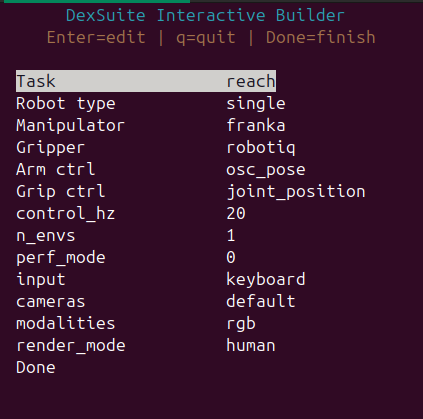
You can navigate the menus to customize parameters, or simply press Enter to keep the default settings.
python -m dexsuite.interactive_builder
By default, the builder:
Launches a full terminal UI (TUI). If
cursesis unavailable, it falls back to a simpler prompt-based UI.Writes the completed configuration to
dexsuite_builder_spec.json.Offers to run the environment immediately using the chosen input device.
Generate a spec file without launching the environment:
python -m dexsuite.interactive_builder --no-run --output dexsuite_builder_spec.json
Run an environment from an existing spec file:
python -m dexsuite.interactive_builder run \
  --config dexsuite_builder_spec.json \
  --input keyboard
Select a UI mode explicitly:
# Full terminal UI
python -m dexsuite.interactive_builder --ui tui

# Simple prompt UI (for environments without curses support)
python -m dexsuite.interactive_builder --ui simple
Next Steps#
API Overview covers the full
ds.make()API and all available parameters.Cameras and Sensors explains how to configure cameras and sensor modalities.