API Overview#
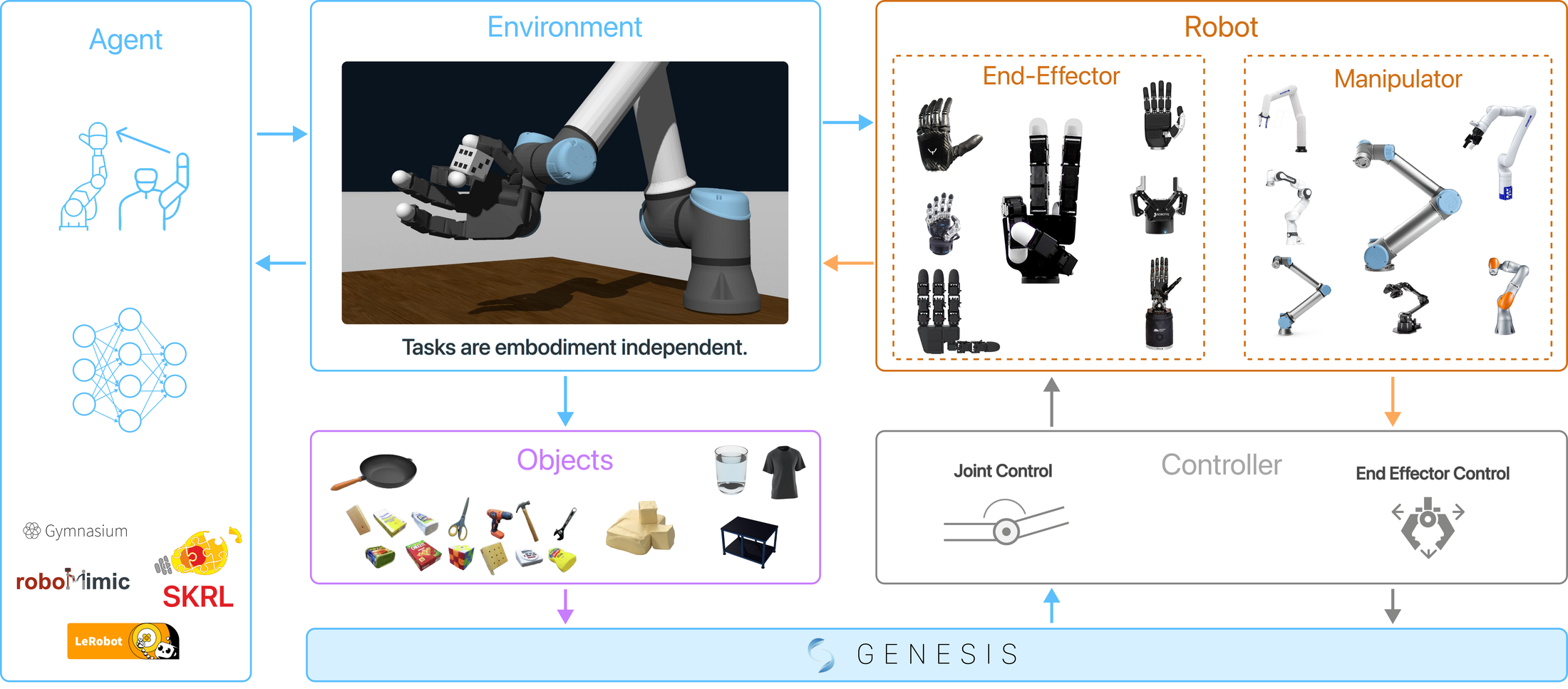
This page explains the public DexSuite surface:
How to create an environment with
dexsuite.make()What
reset()andstep()returnHow actions and observations are structured
The two configuration styles (flat vs component options)
Tools that help you generate configs (HTML builder and interactive builder)
Quickstart (flat API)#
import dexsuite as ds

env = ds.make(
    "lift",
    manipulator="franka",
    gripper="robotiq",
    arm_control="osc_pose",
    gripper_control="joint_position",
    render_mode="human",
)

obs, info = env.reset()
obs, reward, terminated, truncated, info = env.step(env.action_space.sample())
env.close()
Reset and step returns#
DexSuite follows the Gymnasium API shape:
reset() -> (obs, info)step(action) -> (obs, reward, terminated, truncated, info)
terminated and truncated are boolean tensors of shape (n_envs,).
For a single environment (n_envs=1), treat them as 1-element tensors.
Info dict#
DexSuite adds a few standard fields to info:
info["success"]: per-env success maskinfo["failure"]: per-env failure maskinfo["needs_reset"]: per-env mask, true when an episode ended (success, failure, or horizon)
Actions#
DexSuite uses a single, flat action vector.
Single env: shape
(D,)Batched envs: shape
(n_envs, D)
D depends on the robot and controller choices. Inspect it with
env.action_space.shape.
What you can pass to env.step#
env.step(action) accepts:
a torch tensor
a NumPy array
a Python sequence (list/tuple)
DexSuite converts the input to torch.float32 on the environment device. For
batched environments, you can pass a single (D,) action and it will be
broadcast to (n_envs, D).
Observations#
Observations are a dictionary with two top-level keys:
obs["state"]: robot state plus task state (torch tensors)obs["cameras"]: camera outputs (if cameras are enabled)
Single-arm structure#
In single-arm environments, robot state is under:
obs["state"]["manipulator"]obs["state"]["gripper"]
Common fields include:
obs["state"]["gripper"]["tcp_pos"]: tool center point position
Bimanual structure#
In bimanual environments, robot state is split by side:
obs["state"]["left"]["gripper"]["tcp_pos"]obs["state"]["right"]["gripper"]["tcp_pos"]
Task-specific fields#
Tasks can add extra tensors under obs["state"]["other"] by returning them
from _get_extra_obs. DexSuite also stores:
obs["state"]["other"]["action"]obs["state"]["other"]["last_action"]
Two ways to configure ds.make#
DexSuite supports two configuration styles. Both end up building the same objects internally.
For a deeper explanation of every option block (sim, robot, layout, cameras), see Configuration System.
1) Flat API (easiest)#
This is the short form. You specify robot/controller choices with strings.
import dexsuite as ds

env = ds.make(
    "reach",
    manipulator="franka",
    gripper="robotiq",
    arm_control="osc_pose",
    gripper_control="joint_position",
    control_hz=20,
    n_envs=1,
    cameras=("front", "wrist"),
    modalities=("rgb",),
    render_mode="human",
)
For bimanual tasks, pass two manipulators and (optionally) a layout preset:
import dexsuite as ds

env = ds.make(
    "bimanual_reach",
    manipulator=("franka", "franka"),
    gripper="robotiq",
    arm_control="osc_pose",
    gripper_control="joint_position",
    layout="side_by_side",
    render_mode="human",
)
2) Component API (most control)#
This is the explicit form. You pass dataclasses that describe the robot, sim, and cameras.
import dexsuite as ds
from dexsuite.options import CamerasOptions, RobotOptions, SimOptions

env = ds.make(
    "lift",
    robot=RobotOptions(type_of_robot="single"),
    sim=SimOptions(control_hz=50, n_envs=8, performance_mode=True),
    cameras=CamerasOptions(modalities=("rgb",)),
    render_mode=None,
)
Use the component API when you need to:
Override workspace AABBs
Set explicit base poses for robots
Use custom camera definitions
Keep a fully reproducible configuration in one object
Workspaces and layout#
Workspaces are defined per manipulator in Dexsuite/dexsuite/config/workspaces.yaml.
Those AABBs are transformed into the world frame using layout poses.
See Workspace Layout for details and examples.
Tools that help you build configs#
HTML environment builder#
DexSuite includes a small, self-contained HTML tool:
Dexsuite/env_builder.html
Open it in a browser and it will generate ds.make(...) code for common
combinations (task, robot, controllers, cameras, layout). It also shows the
workspace AABB that corresponds to the selected manipulator.
Interactive builder (TUI/CLI)#
DexSuite also ships an interactive builder that runs in your terminal and can save a reusable spec to JSON.
Run it:
python -m dexsuite.interactive_builder
It writes a JSON spec (default: dexsuite_builder_spec.json). You can run
again from an existing spec:
python -m dexsuite.interactive_builder run --config dexsuite_builder_spec.json --input keyboard
Teleoperation#
DexSuite supports several input devices (keyboard, spacemouse, VR devices). The interactive builder can launch a small runner that reads a device and steps the environment.
See:
Dexsuite/dexsuite/interactive_builder/runner.pyfor the teleop loopDexsuite/dexsuite/devices/for device implementations